
Professional EXP Embroidery File Services: Everything You Need to Know
Introduction
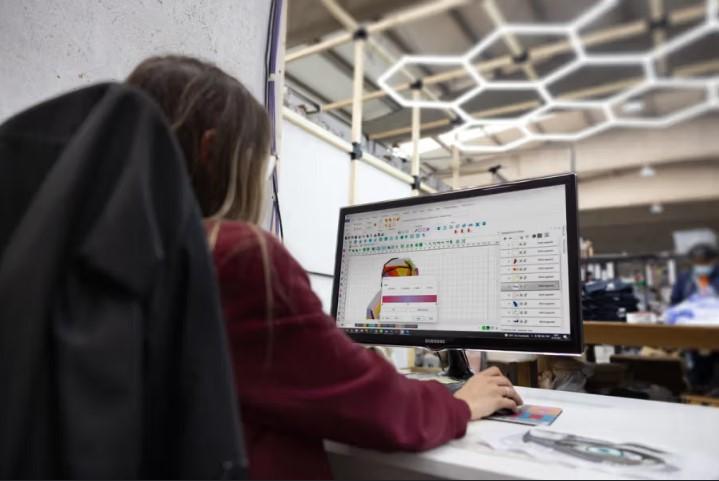
Every successful embroidery project starts with a high-quality embroidery file. No matter how advanced your embroidery machine is, it needs accurate stitch data to produce clean and professional results. A simple image cannot be stitched directly. It must first be carefully digitized into a machine-ready embroidery file. This process helps create smooth stitching, protects the fabric, and improves the overall look of the finished design.
Choosing professional EXP embroidery file services helps turn logos, artwork, and custom designs into accurate embroidery files that are ready for production. Skilled digitizers carefully adjust stitch types, stitch density, underlay, pull compensation, stitch direction, and stitch sequencing to match the design and fabric. This careful work reduces thread breaks, puckering, gaps, and registration problems while producing clean and consistent embroidery for many different projects.
What Is an EXP Embroidery File?
An EXP file is a popular embroidery file format.
It is commonly used with Melco and Bernina embroidery machines.
Unlike image files such as JPG or PNG, an EXP file does not store picture information.
Instead, it stores embroidery stitch instructions.
These instructions tell the embroidery machine:
-
Where each stitch begins
-
Where each stitch ends
-
Which stitch type to use
-
When to change thread colors
-
The stitching order
Without this information, an embroidery machine cannot create the design correctly.
Why Professional Digitizing Is Important
Many people believe they can simply change an image into an embroidery file.
Unfortunately, it is not that simple.
Embroidery machines cannot understand pictures.
They only read stitch data.
Professional digitizers recreate the artwork using embroidery stitches.
Every stitch is planned carefully for better embroidery quality.
How EXP Embroidery Files Are Created
Professional digitizing follows several important steps.
Review the Artwork
The digitizer first studies the design.
They check:
-
Small details
-
Text
-
Colors
-
Shapes
-
Overall layout
High-quality artwork produces better embroidery.
Plan the Stitch Layout
Before digitizing begins, every stitch is planned.
The digitizer selects:
-
Stitch types
-
Stitch density
-
Underlay
-
Pull compensation
-
Stitch direction
-
Stitch sequence
These settings improve embroidery quality and machine performance.
Create the EXP File
The artwork is recreated using embroidery stitches.
The finished design is then saved as an EXP embroidery file.
Test the Design
Whenever possible, a sample stitch-out is completed.
Testing helps identify:
-
Thread breaks
-
Gaps
-
Density issues
-
Registration problems
Small adjustments improve the final result.
Understanding Stitch Types
Different parts of a design require different stitch styles.
Satin Stitch
Satin stitches work well for:
-
Small lettering
-
Borders
-
Company logos
They create a smooth and shiny finish.
Fill Stitch
Fill stitches cover larger areas.
They provide balanced coverage while keeping the design stable.
Running Stitch
Running stitches are perfect for:
-
Fine outlines
-
Small details
-
Decorative lines
Using the correct stitch type improves embroidery quality.
Why Underlay Matters
Underlay is the hidden stitching placed beneath the top stitches.
It supports the embroidery throughout the stitching process.
Good underlay helps:
-
Reduce puckering
-
Improve stitch quality
-
Stabilize the fabric
-
Increase durability
Without proper underlay, embroidery may shift or become uneven.
Stitch Density Makes a Big Difference
Stitch density controls how close stitches are placed together.
Too many stitches can make the fabric stiff.
Too few stitches may leave empty spaces.
Professional digitizers adjust density based on several factors.
Fabric Type
Every fabric reacts differently.
Cotton, polyester, fleece, denim, and canvas all require different settings.
Design Size
Small and large designs need different stitch density.
Balanced settings produce smoother embroidery.
Stitch Direction Improves Detail
Stitch direction affects how embroidery looks.
Good stitch direction helps:
-
Create texture
-
Improve detail
-
Reduce distortion
-
Produce a natural appearance
It also allows the embroidery machine to stitch more smoothly.
Common Problems Professional Digitizing Prevents
Professional digitizing helps prevent many embroidery issues.
Thread Breaks
Smooth stitch paths reduce machine stops.
Fabric Puckering
Balanced underlay and density keep fabric flat.
Uneven Stitching
Correct stitch direction creates even coverage.
Missing Details
Professional digitizing preserves small text and fine artwork.
Benefits of Professional EXP File Services
Working with experienced digitizers offers many important benefits.
Better Stitch Quality
Every stitch is carefully planned.
Faster Production
Machine-ready files reduce setup time.
Lower Material Waste
Accurate files reduce production mistakes.
Better Machine Performance
Well-prepared files help embroidery machines run smoothly.
Consistent Results
Repeat orders produce the same high-quality embroidery every time.
Many embroidery businesses trust Absolute Digitizing because experienced digitizers create embroidery files that deliver clean stitching, reliable machine performance, and consistent quality across many types of embroidery projects.
Choosing the Right Digitizing Company
Not every embroidery service offers the same quality.
Look for these important features.
Experienced Digitizers
Experience makes a noticeable difference.
Professional digitizers understand:
-
Different fabrics
-
Stitch behavior
-
Machine settings
-
Complex logo designs
Manual Digitizing
Manual digitizing creates cleaner embroidery than automatic software.
Every stitch is placed carefully.
Fast Turnaround
Reliable companies complete projects quickly while maintaining quality.
Quality Testing
Good companies test designs whenever possible before delivery.
Where EXP Files Are Used
EXP embroidery files are used for many embroidery products.
These include:
-
Business logos
-
Company uniforms
-
Hats
-
Jackets
-
Patches
-
Sportswear
-
Bags
-
Promotional products
-
Custom apparel
Professional digitizing helps every product look clean and consistent.
Whether you own an embroidery shop, clothing brand, promotional business, or print company, Absolute Digitizing provides professionally digitized EXP files that improve stitch quality, reduce production errors, and deliver dependable embroidery results for commercial embroidery machines.
Frequently Asked Questions
Can I Convert a JPG Directly into an EXP File?
No.
A JPG image must first be professionally digitized into embroidery stitches.
Is Manual Digitizing Better Than Automatic Software?
Yes.
Manual digitizing allows every stitch to be adjusted for better embroidery quality.
Can One EXP File Work on Every Fabric?
Not always.
Different fabrics often require different stitch settings.
Why Should Every Design Be Tested?
Testing helps identify problems before production begins.
It saves time, thread, fabric, and money.
Conclusion
Professional EXP embroidery file services play an important role in creating clean, accurate, and durable embroidery. A carefully digitized EXP file provides the stitch instructions needed for smooth machine performance and excellent embroidery quality. Skilled digitizers carefully adjust stitch density, underlay, pull compensation, stitch direction, and stitch sequencing to match each design and fabric type. This process reduces thread breaks, prevents puckering, improves production efficiency, and creates consistent embroidery results. By choosing an experienced digitizing company, using high-quality artwork, and testing designs before production, businesses and hobbyists can enjoy professional embroidery that looks sharp, lasts longer, and delivers excellent results on every project.

 English
 Arabic
 Spanish
 Portuguese
 Deutsch
 Turkish
 Dutch
Dutch
 Italiano
 Russian
 Romaian
 Portuguese (Brazil)
 Greek
Greek